Yes, your Android phone can run PS2 games, but only if it has the right processor and enough RAM. The safe starting point is a flagship-class chip from 2019 or later, such as a Snapdragon 855 or its equivalent, paired with at least 6GB of RAM. Anything weaker and you will get choppy, unplayable performance on most titles. Read on to find out exactly what works, what does not, and why it matters.
Who this is for: Anyone who wants to play classic PS2 games such as God of War, GTA San Andreas, Shadow of the Colossus, Kingdom Hearts, or Gran Turismo 4 on their Android phone. Whether you are checking if your current phone qualifies or choosing a new one specifically for emulation, this guide answers everything from scratch.
First, Get the Right Emulator
Before worrying about processors and RAM, you need the right app. The wrong emulator will hold you back no matter how powerful your phone is.
AetherSX2 was the original go-to Android PS2 emulator. Its developer shut it down in 2023 after dealing with impersonation, harassment, and coordinated abuse. The app was pulled from Google Play by March 2024. Do not waste time trying to revive it.
NetherSX2 Is the Best Android PS2 Emulator in 2026
NetherSX2, a community fork maintained by developer Trixarian, is the top recommendation for Android PS2 emulation right now. It is ad-free, actively maintained, supports a massive library of PS2 classics, and runs well on modern Android hardware. Whether you want to replay Kingdom Hearts, Jak and Daxter, or Ico, NetherSX2 gives you the best shot at doing it smoothly.
Another option is Play!, which is fully open-source and does not require a BIOS file. It works for casual use but has noticeably weaker compatibility than NetherSX2, so most serious players stick with NetherSX2.
Here is a quick side-by-side comparison of your options:
| Emulator | Status in 2026 | BIOS Required | Best For |
|---|---|---|---|
| NetherSX2 | Active and updated | Yes | Everyone, best compatibility |
| AetherSX2 | Dead, abandoned | Yes | Avoid, no updates since 2023 |
| Play! | Active | No | Casual or open-source users |
NetherSX2 also supports PS2 online multiplayer through community-run private servers. By configuring DNS settings to services like PS2 Online or PSRewired, you can connect to other players online, something that most rival emulators simply do not offer.
One important note: all serious PS2 emulators require a BIOS file dumped from a real PS2 console. NetherSX2 supports several BIOS versions. The SCPH-50001 is considered very stable for NTSC users, the SCPH-70012 offers good compatibility, and SCPH-39001 also has high stability. PAL users need SCPH-5502 and Japanese users need SCPH-5500. Once you have the file, you place it in the bios folder that NetherSX2 creates on first launch. The emulator will prompt you to select a data folder when you open it for the first time.
You can also check out our full article on the best emulator for PS2 on Android and our best emulator for PS2 on PC guide if you want to compare platforms.
What Specs Do You Actually Need to Run PS2 Games on Android?
This is where most people get confused. Minimum specs and playable specs are two completely different things. Here is what you actually need.
Minimum Requirements for NetherSX2
These are the absolute floor, not the target:
- Android version: 8.0 or higher (Android 11 or higher is strongly recommended)
- Processor: a mid-range Snapdragon such as the SD 730, or the Dimensity 1000, or the Exynos 990
- RAM: 4GB minimum
- GPU: Adreno 620 or Mali-G57 equivalent
Recommended Requirements for Smooth Gameplay
These specs give you actual, enjoyable PS2 emulation:
- Android version: 11 or higher
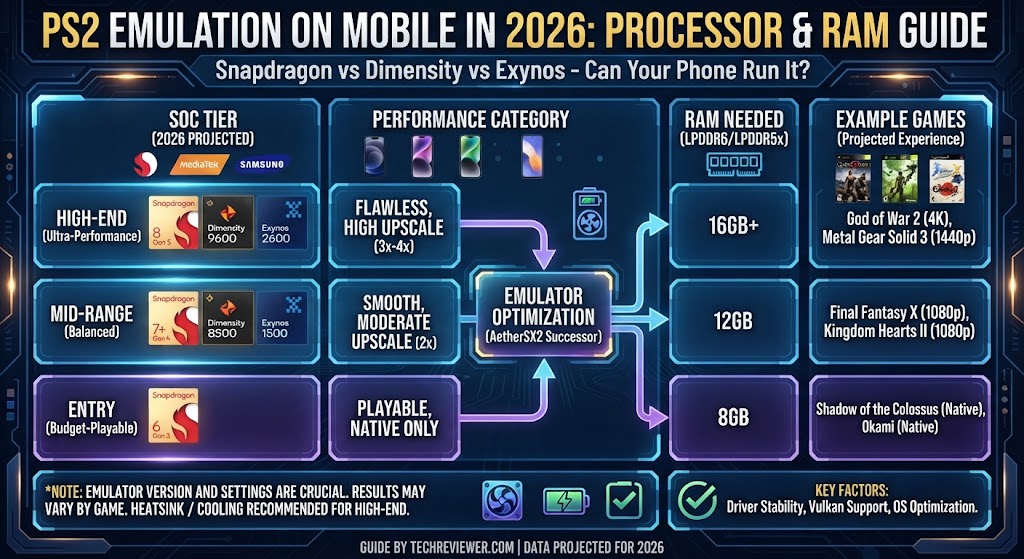
- Processor: Snapdragon 8 Gen 1, Dimensity 9000, or newer
- RAM: 6GB or more, with 8GB being the real sweet spot
- GPU: Adreno 730 or Mali-G710 or better
- Storage: at least 10GB free for a modest game library
The minimum requirement to run most PS2 titles at a 2D or low-polygon 3D level is a flagship-class chip from 2019 or 2020, which includes the Snapdragon 855, Dimensity 1000, or Exynos 990. For smooth play across most of the library at 2x resolution, you want a Snapdragon 8 Gen 1, Dimensity 9000, or newer. Low-end and mid-range chips like the Snapdragon 680, Snapdragon 695, or any Helio G-series will run PS2 emulation below a playable speed on nearly every title. On those devices, you are better off using PCSX2 on a proper PC instead.
How Much RAM Do You Actually Need?
RAM is one of the most common reasons PS2 emulation fails on a phone that seems otherwise capable. Here is what each RAM tier delivers in practice:
- 4GB RAM: the emulator opens but crashes frequently and lags badly on most games
- 6GB RAM: playable and stable on lighter titles, occasional stuttering on heavy games
- 8GB RAM: smooth gameplay across most of the PS2 library, the real minimum for daily use
- 12GB RAM or more: comfortable headroom for demanding games, long sessions, and higher resolution scaling
The emulator uses RAM to store active game data, including textures, audio files, emulator cache, and shader data. When RAM runs out, Android starts killing background processes to compensate, which causes frame drops, audio lag, and sudden crashes. My recommendation is to avoid 4GB entirely if you can. Go for 8GB as your minimum target and you will have a noticeably better time.
Also keep your game ISO files on internal storage rather than an SD card. Running PS2 games from a slow SD card causes stuttering on load and occasional mid-game hitches that internal storage avoids entirely.
Snapdragon vs Dimensity vs Exynos: Which Processor Runs PS2 Games Best?
This is the central question. Let me give you the honest answer for each chip family, backed by real numbers and practical context.
Why the Processor Matters More Than Anything Else
PS2 emulation is uniquely demanding because your phone has to recreate the PlayStation 2’s entire hardware architecture in software, in real time. That includes the Emotion Engine CPU and the Graphics Synthesizer GPU. Every single frame your phone renders, it must first translate PS2 instructions into instructions that your phone’s ARM processor understands, before it can even begin drawing the image. Think of it like being a simultaneous interpreter at a live conference. Miss a beat and the whole experience falls apart.
That process leans heavily on CPU single-core speed and GPU driver quality. A faster, well-optimised chip is the difference between PS2 running smoothly and PS2 stuttering through every scene.
Snapdragon: Still the Best Choice for PS2 Emulation
Snapdragon processors from Qualcomm continue to lead Android gaming and emulation. The main reasons are strong single-core performance, excellent Vulkan GPU driver support through the Adreno GPU family, wide compatibility with emulators including NetherSX2, and consistent thermal management on flagship models.
Snapdragon processors with Adreno GPUs deliver smoother PS2 emulation, better frame rate stability, and fewer graphical glitches compared to other Android chipsets. This is not just marketing language. It comes down to the maturity of Adreno’s Vulkan drivers. NetherSX2 uses Vulkan as its primary rendering path, and Snapdragon’s Adreno GPU has years of refinement in Vulkan support that Mali-based GPUs are still catching up to.
Games like PUBG Mobile and Genshin Impact also unlock exclusive high frame rate modes specifically for Snapdragon devices, modes that are often unavailable on Dimensity or Exynos phones at launch. For emulation, Snapdragon is where the most optimisation work happens.
Here is how different Snapdragon tiers perform in practice:
Budget tier (Snapdragon 665, 680, 695): These chips are not suitable for PS2 emulation. Expect below-playable frame rates on nearly every title. This is confirmed, not an opinion. If you have one of these, use PCSX2 on a PC instead.
Mid-range sweet spot (Snapdragon 870 and above): Devices with the Snapdragon 870 represent the practical sweet spot for budget-conscious buyers. NetherSX2 runs most of the PS2 library at 30 to 60 FPS with per-game tuning. God of War 1, Kingdom Hearts, GTA San Andreas, and Final Fantasy X all run well here with the right settings.
Flagship tier (Snapdragon 8 Gen 1 through 8 Elite): These chips handle the full PS2 library with room to spare. A current flagship on the newest Snapdragon Elite chip runs everything through GameCube and most PS2 titles upscaled without breaking a sweat. On these devices, God of War II at 60 FPS with 2x or 3x internal resolution is entirely realistic.
Dimensity: A Genuine Contender, Especially at Mid-Range
MediaTek’s Dimensity chips have closed the gap with Snapdragon significantly over the past two years. The Dimensity 9400 is strikingly close to the Snapdragon 8 Elite across benchmarks. In real gaming tests using titles like BGMI and Genshin Impact, the two chips score within one or two FPS of each other.
According to benchmark data compiled at Cashify, in AnTuTu v10 the Dimensity 9400 scores approximately 2.69 million points compared to the Snapdragon 8 Elite’s 2.74 million, a difference of roughly 7%. In Geekbench 6, the Snapdragon 8 Elite leads by around 11% in single-core performance. In real gaming sessions at 90 FPS settings in BGMI, the Dimensity 9400 averaged 89 FPS while the Snapdragon 8 Elite averaged 88.7 FPS, effectively identical.
The differences are quite minor overall. Both chipsets perform equally well in most real gaming scenarios. For PS2 emulation specifically, the Dimensity 9000 and above delivers very good results. The Dimensity 1200 handles lighter titles acceptably. Anything below the Dimensity 1000 is unreliable for PS2 work.
The Xiaomi 14T Pro is a good real-world example. It uses a Dimensity 9300+ and handles PS2 emulation excellently, with the Dimensity 9300+ delivering performance that rivals the Snapdragon 8 Gen 3 in most emulation scenarios.
The main area where Dimensity still trails Snapdragon for emulation is Vulkan driver maturity. Vulkan is the best renderer for NetherSX2 on Snapdragon. On Dimensity phones, Vulkan works well at the 9000-series level and above, but some older Dimensity chips deliver more consistent results on OpenGL. If you are on a Dimensity device, test both renderers per game and use whichever is smoother for that title.
Exynos: Honest Assessment for PS2 Emulation
I want to be straightforward with you here. Exynos has historically been the weakest of the three for intensive sustained gaming and emulation. That gap is narrowing with the Exynos 2600, but for most current Exynos-powered devices, there are real limitations worth knowing before you start.
In Geekbench 6 testing comparing the Exynos 2500 to the Snapdragon 8 Elite, the Snapdragon leads by around 32% in single-core and shows substantially higher GPU scores across multiple tests. The 3DMark Wild Life Extreme stress test reveals another important detail: the Exynos 2500 shows a stability score of approximately 41%, meaning its peak performance drops significantly under sustained load. For a two-minute benchmark, this matters little. For a 45-minute God of War session, it matters a great deal.
Exynos Mali GPUs also have quirks with Vulkan drivers that can cause graphical glitches in NetherSX2. The recommended approach for Exynos users is to start with OpenGL as the renderer and switch to Vulkan only if you want to experiment per game. Vulkan is better on Snapdragon, but OpenGL gives Exynos users a more stable baseline.
What Exynos handles acceptably for PS2 emulation: 2D-heavy games, early 3D titles, turn-based RPGs, and lighter action games. Where it struggles: sustained 3D sessions in demanding titles like Shadow of the Colossus, Gran Turismo 4, or Metal Gear Solid 3.
The Exynos 2600, expected to power the Galaxy S26 series, is built on a 2nm process and promises meaningful improvements. Reports indicate Samsung’s 2nm Exynos 2600 chipset is ready for mass production as of late 2025. Whether the gaming and emulation performance truly catches Snapdragon remains to be verified when devices land in reviewers’ hands.
Side-by-Side Comparison
| Feature | Snapdragon | Dimensity | Exynos |
|---|---|---|---|
| PS2 Emulation Performance | Excellent | Very Good | Fair |
| Best Renderer for NetherSX2 | Vulkan | Vulkan (9000-series+) | OpenGL |
| Sustained Thermal Performance | Strong | Good | Moderate |
| GPU Driver Maturity | Best (Adreno) | Good (Mali/Immortalis) | Inconsistent (Mali/RDNA) |
| Game-Level Optimisation | Extensive | Growing | Limited |
| Practical Minimum for PS2 | Snapdragon 870 | Dimensity 9000 | Exynos 2400+ |
The Best Phones for PS2 Emulation in 2026
Now let’s apply all of that chip knowledge to actual devices. These are the phones that deliver real, reliable PS2 emulation.
Best Overall: RedMagic 11 Pro
The RedMagic 11 Pro is the best phone for PS2 emulation in 2026. It is powered by the Snapdragon 8 Elite Gen 5 and pairs that with configurations reaching up to 24GB of RAM. Demanding games run effortlessly at high frame rates, with responsiveness that feels instantaneous rather than merely fast.
Gaming-specific hardware adds practical value beyond the raw specs. The RedMagic 11 Pro includes capacitive shoulder triggers, customisable control mapping, and dedicated gaming interface modes, giving it a feel closer to a handheld console than a standard phone. Its active cooling system also prevents the thermal throttling that plagues other phones during long emulation sessions.
Best Flagship Everyday Phone: ASUS ROG Phone 9 Pro
The ASUS ROG Phone 9 Pro stands as an excellent all-rounder for emulation, offering Snapdragon 8 Elite power, dedicated physical cooling hardware, and customisable air triggers. It handles the full PS2 library at 2x to 3x internal resolution with consistent frame rates across long sessions.
Best Mid-Range Value: Poco F6 Pro or Redmi Note 14 Pro
A Snapdragon 8 Gen 2 or Gen 3 device bought used or discounted delivers around 90% of what a top-tier gaming phone achieves at a fraction of the price. The Poco F6 Pro handles PSP, 3DS, Dreamcast, and lighter PS2 and GameCube titles very well. The Snapdragon 8 Gen 2 delivers genuinely surprising performance for its price. PS2 and GameCube games consistently require at least Snapdragon 8 Gen 2 or equivalent for reliable performance across most of the library.
Best Budget Entry Point: Snapdragon 870 Devices
Phones like the Poco F3, OnePlus 9R, and similar Snapdragon 870 devices represent the practical budget floor for PS2 emulation. Most of the PS2 library runs at 30 to 60 FPS with the right settings. You will not get high-resolution upscaling, but games like Kingdom Hearts, Final Fantasy X, God of War 1, and GTA San Andreas all run well at native or 2x resolution.
Dedicated Android Handhelds: A Strong Alternative
If you are buying a device primarily for emulation rather than daily smartphone use, a dedicated Android handheld deserves serious consideration. The Retroid Pocket 6 is currently one of the easiest starting points for a dedicated Android PS2 handheld. Its Snapdragon 8 Gen 2 gives NetherSX2 far more room than budget chipsets, and the OLED screen makes that upscaled output look genuinely impressive. Setup with NetherSX2 is straightforward, and Retroid’s launcher is the most beginner-friendly Android handheld interface available right now.
The AYANEO Pocket Ace is another premium option, featuring a Qualcomm Snapdragon G3X CPU, 8GB of RAM, and a bezel-less 4.5-inch display with hall-effect joysticks for precision input. Our retro gaming handhelds guide covers these devices in detail if you want to compare dedicated options against your phone.
How to Set Up NetherSX2: Step-by-Step
Let me walk you through setup from scratch. This is the exact process I use.
What you need before you start:
- A PS2 BIOS file dumped from your own PS2 console. This is a legal requirement, not a technicality.
- A PS2 game file in ISO, CSO, BIN, or CHD format, ripped from a disc you own.
- The NetherSX2 APK from the official Trixarian GitHub releases page.
- Android 11 or higher for best stability and Vulkan support.
Step 1: Download and install the APK
Go to the official NetherSX2 GitHub repository. Download the latest release APK. In your Android settings, go to Applications and allow installs from unknown sources, then install the APK.
Step 2: Add your BIOS
On first launch, NetherSX2 prompts you to select a data folder. Choose a folder you control, such as Documents/NetherSX2/. The emulator creates a bios subfolder inside that location. Place your BIOS .bin file there. If you are on Android 10 or earlier, place the file directly in Internal Storage/Documents/NetherSX2/bios/.
Step 3: Add your game files
Tap the folder icon on the main screen and navigate to where your ISO or CHD file is stored. The emulator adds it to your library automatically.
Step 4: Configure your settings
This is where most of the performance difference comes from. Here are the settings that matter most:
Renderer: Use Vulkan on Snapdragon devices and on Dimensity devices running a 9000-series chip or higher. Use OpenGL on Exynos Mali GPUs or older Dimensity devices. If a specific game shows graphical glitches on Vulkan, switch that single game to OpenGL rather than changing your global setting.
Internal resolution: Start at 1x native to confirm stability, then raise to 2x if you have headroom. Treat 3x as a sensible ceiling on most devices. PS2 games were authored for 480i output, and the visual returns flatten quickly above 3x while performance costs keep rising.
Aspect ratio: Use 4:3, which is the accurate default for PS2. Widescreen patches exist for supported titles if you prefer a modern look, but they are optional and per game.
Frame limiter: Turn it on and set it to 60 FPS for NTSC games or 50 FPS for PAL titles. Capping the frame rate reduces heat, cuts battery draw, and makes frame pacing feel more consistent than running unlocked.
MTVU (Multi-Threaded VU1): Enable this. It spreads emulation work across multiple CPU cores and improves frame rates meaningfully on most games. If a specific game behaves oddly with it on, disable MTVU for that game only and keep it on globally.
EE Cycle Rate: Keep at 100% for stability. Raising it can help certain games but often introduces audio issues.
VU Cycle Stealing: Set between 0 and 1. Higher values cause audio glitches and animation problems.
Audio latency: Set to 60 to 80ms using TimeStretch mode. This prevents crackling and audio delay during heavy gameplay.
Texture Filtering: Use Bilinear (PS2) for authentic appearance with minimal performance impact. Add Anisotropic Filtering at 4x or 8x for sharper textures at angles without heavy GPU strain.
Step 5: Save per-game settings
NetherSX2 lets you save a custom settings profile for each game individually. Use this feature. Gran Turismo 4 needs different settings than Kingdom Hearts. Shadow of the Colossus needs different settings than Tekken 5. Tuning per game rather than using global settings gives you dramatically better results across the library.
Which PS2 Games Run Best on Android?
Not every PS2 game demands the same level of hardware. Here is a practical breakdown by difficulty tier so you can match your expectations to your phone’s power.
Light demand, runs on Snapdragon 870 and equivalent: Kingdom Hearts 1 and 2, Final Fantasy X, GTA San Andreas, Tekken 5, Soul Calibur 3, Ratchet and Clank, Jak and Daxter, and most 2D or early 3D titles from the first half of the PS2 library.
Moderate demand, needs Snapdragon 8 Gen 1 or Dimensity 9000 and above: God of War 1, Devil May Cry 3, Dragon Ball Z Budokai Tenkaichi 3, Burnout Revenge, and most fast-paced action games with complex particle effects.
Heavy demand, flagship-only territory: Shadow of the Colossus, Gran Turismo 4, Metal Gear Solid 3, Burnout 3 Takedown, and God of War 2. These titles push even current flagship chips when running at higher internal resolutions.
According to Wikipedia’s PCSX2 article, as of May 2025, 99% of PlayStation 2 games are considered playable or better on the emulator, meaning they can be played largely but not necessarily entirely free of issues, and all at least boot to the menu screen. That 99% figure applies to PCSX2 on PC, which has more resources to draw on than an Android phone. On Android with NetherSX2, your mileage will vary by title and by device, but the emulator compatibility foundation is strong.
Why Is Samsung Still Using Exynos?
A lot of people ask this, especially buyers in Europe who end up with an Exynos Galaxy S phone while American buyers get Snapdragon.
The short answer is cost control and supply chain independence. By using its own Exynos chips in regions like Europe, Samsung reduces dependency on external suppliers and avoids paying Qualcomm licensing fees, while US and Chinese markets typically receive Snapdragon chips. It is a business decision, not a performance decision.
The financial pressure behind it is real. Samsung spent approximately 8.87 billion US dollars on mobile chipsets in 2023, a figure that included a 30% spike in chip prices compared to the previous year. By manufacturing and deploying more Exynos chips internally, Samsung lowers that spend significantly.
Samsung also designs both its hardware and One UI software together, which allows for hardware-software integration benefits in areas like battery management and heat regulation, at least in theory. The investment in Exynos also feeds Samsung’s broader semiconductor strategy, where keeping their own chip foundry busy with internal orders helps them maintain capacity and attract external clients.
The practical downside for buyers is that Exynos has consistently underperformed Snapdragon in gaming and sustained workloads. Samsung has faced persistent criticism on this front. The Exynos 2600 on 2nm process technology is the company’s attempt to close that gap properly. Whether it succeeds will become clear once independent testing of Galaxy S26 devices begins.
When Will PS2 Emulation Not Work on Your Phone?
Be honest with yourself before you start. Android PS2 emulation has real limits, and pushing a phone that is not ready for it is just frustrating.
Do not expect PS2 emulation to work well if you have:
Any phone with a Snapdragon 600-series chip, any Helio G-series chip, any Exynos 900-series entry-level chip, or anything with less than 6GB of RAM. Android 9 or lower also causes driver support problems that lead to crashes and visual corruption in NetherSX2.
You will also hit a wall with:
Phones that already struggle to sustain peak performance during regular gaming. If Genshin Impact or PUBG already drops frames on your device, PS2 emulation will be worse. Phones without Vulkan 1.1+ GPU driver support cannot use NetherSX2’s best rendering path. All 32-bit devices are incompatible entirely, as NetherSX2 requires 64-bit ARMv8 architecture.
Due to the complexity of PS2’s hardware, emulation is very resource-hungry. You genuinely need a fairly powerful Android device for NetherSX2 to run smoothly. If your current phone falls below that line, the better path is to use PCSX2 on a PC and then stream it to your phone. Our guide on how to play PC games on your phone covers that approach in full, and our Moonlight PC streaming setup guide shows you exactly how to do it with low latency over your home network.
Which Processor Is the Fastest in Android Right Now?
Since we are already deep into chip comparisons, here is a broader answer for gaming overall.
According to benchmark data from multiple sources including Nanoreview, Cashify, and CPU-Monkey, the Snapdragon 8 Elite Gen 4 and 5 lead across most performance categories. In single-core Geekbench scores, the Snapdragon 8 Elite is approximately 8 to 11% ahead of the Dimensity 9400. In AnTuTu, the gap is around 7 to 10% depending on the device. In real gaming frame rates during titles like Genshin Impact and BGMI, the difference between Snapdragon and Dimensity at flagship level is often one to two FPS, which is functionally identical.
The Exynos 2500 trails more significantly. In Geekbench 6 single-core, the Snapdragon 8 Elite leads by approximately 32%, and in 3DMark GPU tests the margin is substantial. The Exynos 2600 on 2nm is expected to change this picture when Galaxy S26 devices reach reviewers.
For the fastest sustained Android gaming chip available in 2026, Snapdragon 8 Elite Gen 5 in devices like the RedMagic 11 Pro is the current answer. For the best value-to-performance ratio at flagship level, Dimensity 9400 in phones like the OnePlus 13 or Xiaomi 15 Pro comes very close for a lower price.
Do You Need a Controller for PS2 Emulation?
Yes, and I strongly recommend using one. Touchscreen controls technically work in NetherSX2 with on-screen buttons, but analog-heavy games like Gran Turismo 4, God of War, and Metal Gear Solid 3 become genuinely difficult without physical analog sticks and trigger buttons. The precision simply is not there with touch input.
Almost any Bluetooth controller pairs easily with Android. The PlayStation DualSense, Xbox Wireless Controller, and 8BitDo Pro 2 all work out of the box. Our full guide on how to use a controller with mobile games walks you through the exact setup steps, and our best PC controllers guide includes options that pair seamlessly with Android over Bluetooth.
For dedicated gaming phone users, the RedMagic 11 Pro’s built-in shoulder triggers also help significantly with titles that use L2 and R2 inputs heavily.
Frequently Asked Questions
What is the best phone for PS2 emulation in 2026?
The RedMagic 11 Pro is the top pick, powered by the Snapdragon 8 Elite Gen 5 with up to 24GB of RAM and built-in active cooling. For an everyday phone that still handles PS2 excellently, the ASUS ROG Phone 9 Pro or Samsung Galaxy S26 Ultra are strong alternatives. For the best value, the Poco F6 Pro with Snapdragon 8 Gen 2 covers most of the PS2 library at a fraction of flagship pricing.
Which processor is best for gaming, Snapdragon, Dimensity, or Exynos?
Snapdragon is the safest choice for gaming and PS2 emulation because of Adreno GPU maturity, game-level optimisation from developers, and consistent Vulkan driver support. Dimensity is a genuine competitor at flagship level, often within one or two FPS in real-world gaming. Exynos comes third due to thermal throttling under sustained load and weaker Vulkan driver consistency.
What specs do I need to run a PS2 emulator?
The minimum viable setup is a 2019-era flagship chip such as the Snapdragon 855, Dimensity 1000, or Exynos 990, paired with 6GB of RAM and Android 11 or higher. For smooth, comfortable play across most PS2 games, target a Snapdragon 8 Gen 1 or Dimensity 9000 chip, 8GB of RAM, and an Adreno 730 or Mali-G710 GPU or better.
Can MediaTek Dimensity beat Snapdragon for gaming?
At flagship tier, the Dimensity 9400 matches the Snapdragon 8 Elite in most real gaming scenarios within a margin of one to two FPS. Snapdragon leads in single-core CPU speed, Adreno Vulkan driver quality, and developer-level game optimisation. In the mid-range, Dimensity regularly outperforms equivalent Snapdragon chips at the same price point. The blanket claim that Snapdragon is always better has been outdated since around 2022.
Is Exynos better than Dimensity for gaming?
No, based on current data. Dimensity outperforms Exynos in sustained gaming sessions at comparable tiers. The Exynos 2500 shows around 41% stability scores in 3DMark stress testing, meaning it drops well below peak under sustained load. Dimensity handles long sessions more consistently. The Exynos 2600 on a 2nm process may change this comparison, but that data is not yet available from independent testing.
Which Android PS2 emulator is best?
NetherSX2 is the best Android PS2 emulator in 2026. It is ad-free, actively maintained, offers excellent game compatibility, and supports online multiplayer through community servers. AetherSX2 is abandoned. Play! is a secondary option for those who prefer open-source emulation without a BIOS requirement.
The Bottom Line
Here is the simple version. If you want to play PS2 games on your Android phone:
Get NetherSX2 from the official GitHub. Aim for a Snapdragon 870 at minimum, or a Dimensity 9000 if you are on MediaTek. You need 6GB of RAM to start and 8GB for comfortable daily use. Flagship chips from the Snapdragon 8 Gen 1 generation and newer give you the full PS2 library at higher resolution. Exynos works but switch to OpenGL and set your expectations accordingly on demanding titles. A proper controller makes the whole experience dramatically better.
The PS2 library is enormous and genuinely excellent. Playing Shadow of the Colossus on a modern OLED phone screen, upscaled and stable, feels like rediscovering something special. Getting the setup right is worth the effort.
If you want to go even further with your mobile gaming setup, take a look at our picks for the best gaming phones and our guide on how to use a controller with mobile games for the next step up.