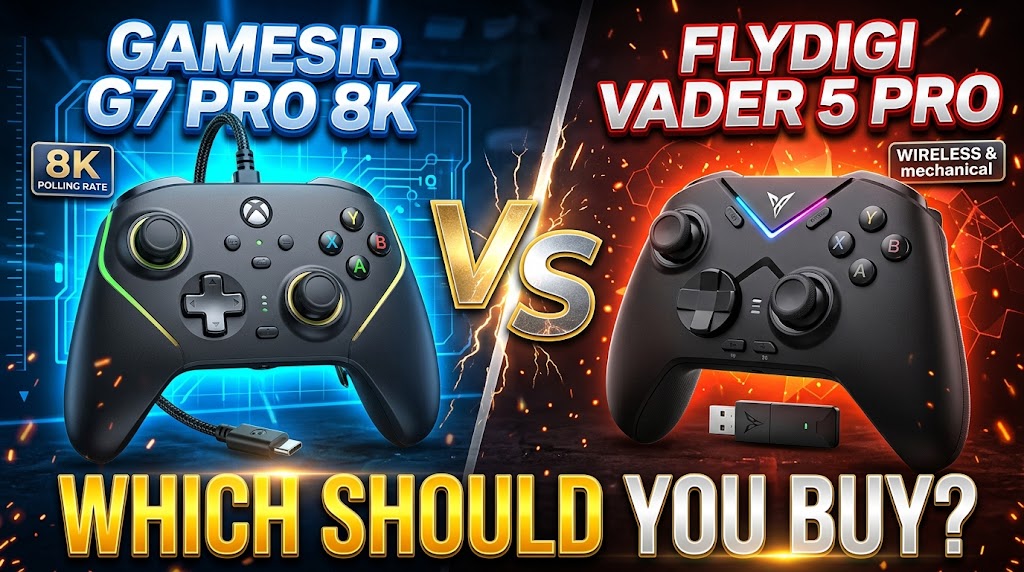
The GameSir G7 Pro 8K and Flydigi Vader 5 Pro are designed for players who want more control than a standard gamepad provides. Both offer magnetic thumbstick sensing, dual-mode triggers, motion controls, and extra buttons. Their biggest differences are how quickly they report inputs, how their sticks feel, and how many controls you can customize.
Choose the GameSir G7 Pro 8K if you mainly play competitive PC shooters and prioritize low input latency. Choose the Flydigi Vader 5 Pro if you want adjustable stick tension and more physical buttons for different games. The GameSir has the stronger case for high-polling-rate PC play, while Flydigi offers more flexibility in the way you control games.
Neither controller is automatically better for every player. Here is what the specifications and available testing actually tell us.
GameSir G7 Pro 8K vs Flydigi Vader 5 Pro: Specifications Compared
| Feature | GameSir G7 Pro 8K PC | Flydigi Vader 5 Pro |
|---|---|---|
| Thumbstick technology | Gen-2 Mag-Res TMR | FORCEFLEX Hall Effect |
| Polling rate | Advertised up to 8,000 Hz on PC | Independent comparison data records 1,000 Hz wired and 2.4 GHz in one test setup |
| Stick tension | Fixed physical tension | Adjustable from 40 to 100 gf |
| Extra remappable controls | 4: two rear buttons and two mini bumpers | 8: four rear buttons, two extra bumpers, and C/Z face buttons |
| Trigger modes | Hall Effect analog and micro-switch | Hall Effect analog and micro-switch |
| Connection options | USB-C wired and 2.4 GHz wireless; verify the exact PC model’s supported modes | USB wired, 2.4 GHz wireless, and Bluetooth |
| Gyroscope | Six-axis motion control | Six-axis gyroscope |
| Vibration | Dual asymmetric grip motors | Four motors across grips and triggers |
| Customization software | GameSir Connect | Flydigi Space Station |
| Stick-tension adjustment | No physical tension ring listed | Yes |
| Official store price | Confirm the current listing and checkout price | $79.99 on the official US store when checked |
| Best reason to buy | High-polling-rate PC performance | Adjustable sticks and extra controls |
Specifications are based on the official GameSir G7 Pro 8K PC listing, the official Flydigi Vader 5 Pro listing, and independent latency testing discussed below. Prices, stock, firmware, and supported features can change.
One important distinction: GameSir advertises an 8,000 Hz mode, but its product page also displays a 6,810 Hz polling figure. Independent testing has confirmed operation near the advertised 8,000 Hz level under specific conditions. The result you get depends on the setup and testing method, so it is more useful to compare measured performance than to treat a marketing number as a complete measure of responsiveness.
1. Input Latency and Polling Rate: Is the GameSir Really Faster?
The GameSir G7 Pro 8K’s main selling point is its high polling rate. To understand whether it matters, it helps to separate two terms.
Polling rate measures how frequently a controller reports its current inputs to the connected device. At 8,000 Hz, the theoretical interval between reports is 0.125 milliseconds. At 1,000 Hz, it is 1 millisecond.
Input latency measures how long an input takes to register within a particular test setup. It can be affected by the controller’s electronics, connection, operating system, game, and measurement method.
A controller reporting inputs every 0.125 milliseconds does not mean every button press reaches the game in 0.125 milliseconds.
What independent testing found
In its review of the GameSir G7 Pro 8K Aimlabs Edition, Notebookcheck verified the 8,000 Hz polling mode using a polling-rate tester. The review reported average latency of about 1.1 milliseconds wired and 3.5 milliseconds over 2.4 GHz wireless in its testing.
A separate set of measurements recorded by Gamepadla showed a different picture for individual inputs. In that dataset, the GameSir’s wired button latency averaged approximately 1.36 ms, while its stick latency averaged 2.46 ms. The Vader 5 Pro measured approximately 3.04 ms for wired buttons and 2.38 ms for wired stick input.
Those figures should not be treated as a universal head-to-head result. The tests may use different firmware, hardware revisions, input conditions, and measurement methods. Gamepadla also flags its comparison module as being in testing.
The useful conclusion is that the GameSir can report inputs at a much higher rate, and independent testing has shown very low wired latency. However, the polling-rate figure alone does not prove that every type of input is faster in every connection mode.
Will you notice the difference in a game?
The higher polling rate is most relevant if you play competitive PC shooters, use a high-refresh-rate monitor, and are sensitive to small differences in aiming response.
For slower games, turn-based titles, and many single-player adventures, the practical difference may be less noticeable. Your stick deadzone, sensitivity, aim technique, and the game’s own input processing can matter more than the polling rate.
Verdict: GameSir is the better starting point if high-polling-rate PC performance is your main reason for upgrading. Do not buy it expecting every action to become eight times faster.
2. TMR vs Hall Effect Sticks: Which Technology Should You Choose?
The GameSir uses Gen-2 Mag-Res TMR thumbsticks. The Vader 5 Pro uses FORCEFLEX Hall Effect thumbsticks.
Both technologies use magnetic sensing to detect stick position. Unlike conventional potentiometer designs that rely on physical electrical contact at the sensing element, magnetic sensing can reduce wear associated with that contact. Neither technology makes the entire stick mechanism immune to wear, poor calibration, centering problems, or every possible form of drift.
GameSir G7 Pro 8K: TMR sensing
TMR stands for tunneling magnetoresistance. GameSir’s Gen-2 Mag-Res implementation is designed to provide precise stick-position readings.
The potential benefit is detailed control when making small aiming corrections or tracking a moving target. GameSir also advertises a high-resolution stick system and adjustable software settings for deadzones and response curves.
However, a TMR label does not guarantee that every unit will have perfect centering or that every player will prefer its feel. The physical stick mechanism, firmware, calibration, and quality control still matter.
Flydigi Vader 5 Pro: Hall Effect with adjustable tension
The Vader 5 Pro uses Flydigi’s FORCEFLEX Hall Effect sticks. Its most distinctive feature is the physical tension-adjustment ring, which the manufacturer rates from 40 to 100 gf.
That lets you change how much force is needed to move the stick.
- Lower tension: A lighter feel for fast turns and quick directional changes.
- Higher tension: More resistance for players who prefer a firmer stick when tracking targets or making controlled movements.
- Different preferences for different games: You can tune the stick feel instead of adapting to one fixed resistance.
This adjustment changes physical resistance, not the game’s sensitivity setting. You may still need to adjust deadzones or response curves separately.
Does TMR automatically beat Hall Effect?
No. TMR and Hall Effect are different sensing technologies, but the overall controller design determines how the stick performs. A well-implemented Hall Effect stick can be a better fit for one player than a TMR stick, and vice versa.
The GameSir’s advantage is its TMR implementation combined with high-polling-rate PC operation. The Vader’s advantage is the ability to change physical stick tension.
Verdict: Choose GameSir if you prefer its fixed stick feel and want its high-polling-rate setup. Choose Flydigi if physical tension adjustment is a feature you know you will use.
3. Extra Buttons: Four vs Eight Remappable Controls
Extra buttons are useful when they let you perform an action without taking your thumb off an analog stick. The number of controls matters, but their placement and your grip matter too.
GameSir G7 Pro 8K
GameSir advertises four extra remappable controls: two rear buttons and two mini bumpers. Its GameSir Connect software supports customization such as button mapping, macros, stick curves, trigger response, vibration, and RGB lighting.
For an FPS player, you could map jump and crouch to the rear buttons, then use the mini bumpers for reload or melee if those assignments work with your game.
This setup gives you several useful shortcuts without requiring you to manage a large number of extra buttons.
Flydigi Vader 5 Pro
Flydigi lists eight extra remappable controls: four rear buttons, two extra bumpers, and the C/Z face buttons.
The four rear buttons are especially useful if you want to keep both thumbs on the sticks while performing several actions. For example, a shooter player could assign jump, crouch, reload, and melee to the rear controls. In a racing game, additional controls might handle gear changes, handbrake, or boost.
The Vader 5 Pro also uses mechanical micro-switch ABXY buttons, according to Flydigi’s specifications. Some players prefer the distinct click, while others prefer the quieter or softer feel of different button designs.
More controls do not automatically make a controller better. If you only need two rear shortcuts, the GameSir may provide enough. If you use several commands frequently, the Vader’s additional buttons are a more meaningful advantage.
Verdict: Flydigi wins on the number and variety of extra physical controls. GameSir may be easier to adapt to if its four extra controls cover everything you need.
4. Trigger Modes: Both Controllers Offer Flexibility
Both controllers provide two trigger modes: analog Hall Effect input and a click-style micro-switch mode.
Analog triggers register different levels of pressure. That is useful in racing games, where you may want to apply partial acceleration or braking instead of treating the trigger as a simple on/off button.
Micro-switch mode gives the trigger a more immediate click-style action. This can be useful in shooters and other games where you want a fast digital input rather than a full analog range.
For example, you could use analog triggers while driving in a racing game, then switch to micro-switch mode for a shooter. The best setting depends on the game’s control scheme and whether it benefits from variable trigger pressure.
Both controllers support this basic choice, so neither has a clear overall advantage based on trigger modes alone.
Verdict: A tie on the core feature. Consider the feel of the trigger, the physical switch mechanism, and whether you prefer a short click or a gradual pull.
5. Wired vs Wireless: Which Connection Makes More Sense?
Both controllers offer more than one connection option, but their connection modes should not be assumed to perform identically.
GameSir G7 Pro 8K
The G7 Pro 8K PC is built around PC gaming and advertises its high polling rate in wired and 2.4 GHz modes. Notebookcheck verified the high polling mode in both wired and wireless testing.
For competitive play, wired USB-C is a sensible baseline because it avoids wireless interference and battery concerns. The 2.4 GHz dongle offers more freedom of movement, but its actual latency depends on the setup.
Flydigi Vader 5 Pro
The Vader 5 Pro supports wired USB, 2.4 GHz wireless, and Bluetooth. This makes it flexible for compatible devices and setups.
Independent measurements show why connection mode matters. In one Gamepadla test set, the Vader’s average wired button latency was around 3.04 ms, compared with around 3.98 ms over 2.4 GHz. Bluetooth latency was much higher in that particular test.
These figures are not guarantees for every unit or firmware version, but they illustrate a practical point: Bluetooth is often chosen for convenience, not as the first choice for competitive latency-sensitive gaming.
Verdict: Use wired or 2.4 GHz for latency-sensitive PC play. Choose Bluetooth when it is the convenient supported option for your device and game.
6. Software and Customization
The hardware is only part of the experience. You also need to configure the controller, update firmware when necessary, and save settings that work for your games.
GameSir Connect
GameSir Connect supports PC customization, including button mapping, macros, stick curves, trigger response, vibration, and RGB settings. Notebookcheck found the application useful for changing settings and saving profiles during its review.
This is a good fit for players who want to tune deadzones and input response on a PC.
Flydigi Space Station
Flydigi Space Station provides button remapping and profile customization for the Vader 5 Pro. The controller also supports on-the-fly adjustments for certain settings.
The main practical question is whether the software works smoothly with your operating system and the games you play. Before relying on macros or advanced mappings, confirm that the feature works in your chosen game and does not conflict with its rules or anti-cheat restrictions.
Verdict: Both provide substantial customization. The GameSir is a strong choice for PC tuning, while the Vader’s combination of software profiles and extra physical controls is appealing if you want several different layouts.
7. Compatibility: Check the Exact Model Before Buying
Compatibility is an area where you should be especially careful. Similar model names do not guarantee the same supported devices or connection modes.
The GameSir G7 Pro 8K PC is a specific PC-focused product. Do not assume that its compatibility matches every other controller in the G7 family. Check the official GameSir product page for the exact model and connection options before ordering.
The Vader 5 Pro offers wired, Bluetooth, and 2.4 GHz connections, but the presence of those connection modes does not mean every console supports the controller or every feature. Check the official Flydigi listing for current supported devices.
Before paying, confirm:
- Your PC, operating system, or console is supported.
- The controller works with your preferred connection mode.
- The game recognizes the controller correctly.
- Gyro, extra-button mapping, and software features work on your platform.
- The seller has a return policy if the controller does not suit your setup.
Verdict: Buy based on verified compatibility with your exact device, not just the controller’s feature list.
8. Price and Value: Which Controller Is Worth Your Money?
Flydigi’s official US store listed the Vader 5 Pro at $79.99 when checked. The GameSir listing available for this comparison did not provide a sufficiently clear, matching current checkout price to make a reliable direct price comparison.
That means it would be misleading to claim the Vader is definitely cheaper by a fixed amount. Retail prices can vary with sales, regional availability, shipping, and seller warranty terms.
Instead, compare the final price you can actually pay and consider what you will use.
When the GameSir is worth considering
The GameSir makes sense if you play competitive PC games and specifically want its high-polling-rate mode, TMR sticks, and PC customization tools.
If you will use only a standard polling rate or mostly play slower games, its headline polling number may not justify paying more than you would for another capable controller.
When the Vader 5 Pro is worth considering
The Vader 5 Pro is attractive if you want physical stick-tension adjustment, eight extra remappable controls, mechanical ABXY buttons, and several connection options.
Its official store also lists a one-year warranty and a 30-day money-back guarantee under its stated conditions. Check whether those terms apply to your location and purchase route, especially if buying through a marketplace or regional reseller.
Verdict: Compare the final delivered prices and warranty terms. The Vader’s strongest value proposition is its adjustable sticks and extra controls, while the GameSir’s is high-polling-rate PC performance.
9. Which Controller Should You Buy for Your Games?
| Your main priority | Better starting choice | Reason |
|---|---|---|
| Competitive PC shooters | GameSir G7 Pro 8K | High-polling-rate mode and strong wired latency results in independent testing |
| Racing games | Flydigi Vader 5 Pro | Adjustable stick tension and dual-mode triggers |
| Fighting games | Flydigi Vader 5 Pro | More extra controls, plus a rotary-pivoted D-pad design |
| Action games and RPGs | Flydigi Vader 5 Pro | More buttons available for skills, dodge, and shortcuts |
| Precise stick-tension preference | Flydigi Vader 5 Pro | Physical 40–100 gf tension adjustment |
| PC input tuning | GameSir G7 Pro 8K | GameSir Connect supports stick curves, deadzones, and trigger response |
| Players who only need a few extra controls | Either | The best layout is the one you can use comfortably |
| Wireless convenience | Flydigi Vader 5 Pro may suit you | It offers wired, 2.4 GHz, and Bluetooth options, subject to device compatibility |
These recommendations are based on documented features and published testing, not personal hands-on testing of both controllers across every listed game.
Frequently Asked Questions
Is Flydigi better than GameSir?
Neither brand is universally better. The Vader 5 Pro has adjustable stick tension and more extra physical controls. The GameSir G7 Pro 8K emphasizes high-polling-rate PC performance and TMR sticks. Choose based on the features you will actually use.
Is the Flydigi Vader 5 Pro worth it?
It is worth considering if you want adjustable stick resistance, four rear buttons, extra bumpers and C/Z controls, mechanical ABXY buttons, and multiple connection options. Its official US store listed it at $79.99 when checked. Confirm the current price and warranty before buying.
Is the GameSir G7 Pro 8K the best controller for PC?
It is a strong option for competitive PC players who want a high polling rate and low input latency. However, a high polling rate alone does not make a controller the best choice for everyone. The Vader 5 Pro may suit players who prioritize adjustable stick tension and more physical controls.
Does 8,000 Hz polling make a controller eight times faster?
No. It means the controller can report its state at a much higher frequency than a 1,000 Hz mode. It does not mean every input reaches the game eight times faster. The controller’s processing, connection, game engine, and display all affect the final response.
Are TMR sticks better than Hall Effect sticks?
Not automatically. TMR and Hall Effect use different magnetic sensing methods. The mechanical design, centering, calibration, firmware, and manufacturing quality all affect the result. The Vader 5 Pro’s adjustable physical tension is a separate advantage that does not depend on which sensor technology you prefer.
Which controller has more buttons?
The Vader 5 Pro lists eight extra remappable controls: four rear buttons, two extra bumpers, and C/Z face buttons. GameSir lists four extra remappable controls: two rear buttons and two mini bumpers.
Which controller is better for racing games?
The Vader 5 Pro is a strong starting choice because you can physically adjust stick resistance and switch between analog and micro-switch trigger modes. Analog triggers are useful for controlling acceleration and braking gradually.
Can I use the GameSir G7 Pro 8K on Xbox?
Do not assume that you can. The G7 Pro 8K PC is a distinct model, and compatibility should be checked against its own official documentation. Do not use compatibility claims for another G7 model as proof that the 8K PC version supports Xbox.
Final Verdict: GameSir G7 Pro 8K vs Flydigi Vader 5 Pro
The GameSir G7 Pro 8K is the more compelling choice if you primarily play competitive PC shooters and want to explore high-polling-rate input. Its TMR sticks and PC customization tools make it worth considering, but the 8,000 Hz headline should not be confused with total system latency.
The Flydigi Vader 5 Pro is the better fit if you want to customize how the sticks feel and use more physical controls. Its adjustable tension ring, four rear buttons, additional bumpers, and C/Z buttons offer practical advantages across racing, fighting, action, and role-playing games.
My recommendation: For a player who wants one customizable controller for a wide variety of genres, start with the Flydigi Vader 5 Pro. For a competitive PC player who prioritizes high-polling-rate performance, consider the GameSir G7 Pro 8K.
Before buying, verify the current price, supported devices, warranty, and return policy from the seller. Those details may have a bigger effect on your satisfaction than a small difference in a specification sheet.
For more options, see our best PC controllers guide, which can help you compare these models with controllers at other price points.